Google now answers a lot of searches with an AI Overview before anyone reaches the blue links. When your page is quoted in that summary, you get attention even if nobody clicks. When a competitor is quoted instead, you lose that attention and probably never notice.
An AI Overview tracker fixes that blind spot. It shows which of your target searches trigger an AI Overview and whose pages Google cites inside it. This guide covers what to track, where free data runs out, and what to do once you can see where you stand.
Key takeaways
- A tracker records three things for each query: whether an AI Overview appears, which pages Google cites, and whether your page is one of them.
- Google Search Console counts AI Overview traffic inside the normal "Web" performance report, so Search Console alone cannot tell you when you were cited.
- Clicks drop sharply when an AI summary appears. That makes being the source named in the summary more valuable, because that is the brand readers see.
- Google says you don't need special markup or files to appear in AI Overviews. Indexing, snippet eligibility and clear, quotable answers do most of the work.
- Tracking only pays off when someone acts on the gaps it finds.
At a glance
- What gets tracked: whether an AI Overview appears, which URLs it cites, your citation share and competitors' citation share over time.
- Free options: manual spot checks plus Google Search Console.
- Paid options: rank trackers that cover SERP features, dedicated AI visibility tools and autonomous platforms such as RankMesh (our product).
- How often to check: weekly for priority queries, so you see trends instead of reacting to one-off snapshots.
- Biggest blind spot: Search Console does not separate AI Overview citations from regular organic results.
What is an AI Overview tracker?
An AI Overview tracker is a tool or process that checks your target Google searches on a schedule. For each search it records whether an AI Overview appears, which sources it links and whether your site is cited. Over time, that record shows your citation share, which competitors Google trusts more and which pages need work.
A classic rank tracker answers the question "What position am I in?" Citation tracking answers a different question: "When Google writes the answer, does it quote me?" The two results often disagree. A page can rank third organically and still be missing from the AI Overview above it, while a page from further down the results gets cited.
That is why people searching for an AI Overview rank tracker or an AI Overview visibility tracker usually want the same thing: proof of whether Google uses their content as a source. Some tools describe this as your "AI Overview status" for a keyword: no Overview, Overview without you, or Overview citing you.
Why does tracking AI Overview citations matter now?
Citation tracking matters because the summary now absorbs clicks that used to go to organic results. When an AI Overview appears, fewer people scroll and click, so the sources named inside the summary get the visibility. Without tracking, a business can hold steady rankings and still lose traffic without knowing why.
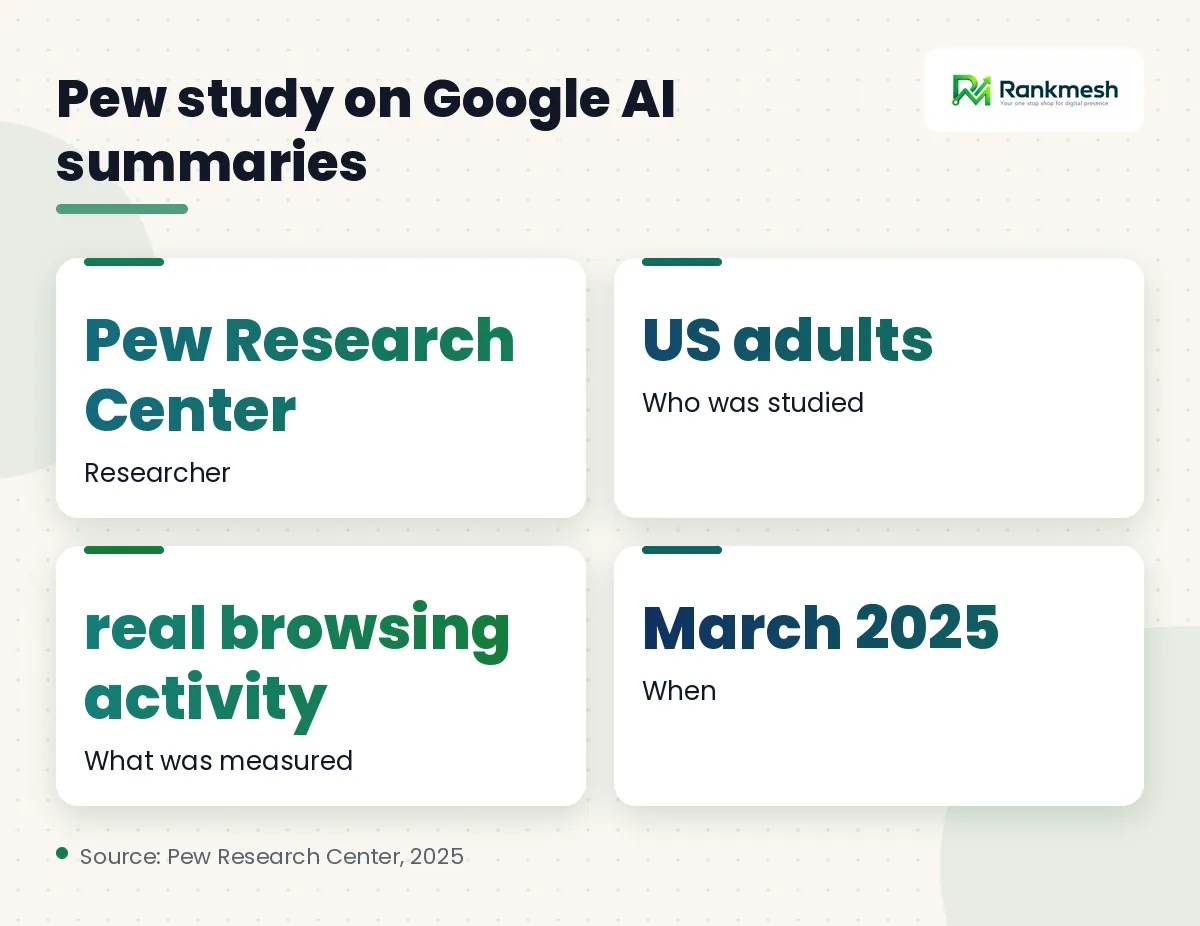
The clearest public data comes from the Pew Research Center, 2025, which studied the real browsing activity of US adults in March 2025. Here is what Pew found:
The headline finding is the one every marketing team should know:
Google users clicked a traditional search result in 8% of visits when an AI summary appeared, compared with 15% when none did (Pew Research Center, 2025).
Share on LinkedIn · Share on X
Pew's study covers one month of US browsing, so treat the exact figures as one strong data point rather than a universal rule. The direction is still clear. If buyers read the summary and stop, the brand named in the summary is the brand they remember.
Can Google Search Console show AI Overview traffic?
Google Search Console includes AI Overview traffic, but it does not isolate it. Google's documentation says traffic from AI features is reported in the Performance report under the "Web" search type. That means AI Overview clicks and impressions are blended with regular results, and Search Console cannot confirm whether a specific page was cited.
Google's own guidance on AI features is still useful for setting expectations (Google Search Central, 2025):
- A page must be indexed and eligible to show in Google Search with a snippet to appear as a supporting link in AI Overviews or AI Mode.
- Google says there are no additional requirements, and you do not need new machine-readable files, AI text files or special markup.
- AI Overviews may use "query fan-out", which means Google runs several related searches across subtopics to build one answer. Your page can be cited for a question you never targeted directly.
So Search Console tells you your total Google traffic, but not your citation status. To see when Google quotes you, you need either a manual routine or a dedicated tool.
How do you track AI Overviews manually?
You can track AI Overviews manually by searching your priority keywords on a fixed schedule and logging what you see in a spreadsheet. Manual tracking costs nothing and teaches you how Overviews behave in your niche. The trade-off is time, and the results vary with location, device and login state.
A simple weekly routine looks like this:
- Pick your priority queries. Start with a few dozen searches tied to revenue: product categories, "best" comparisons and the problem-based questions your buyers ask.
- Search in a clean browser. Use a private window, stay signed out and note the location and device you used, because AI Overviews shift between them.
- Record the status. For each query, log whether an AI Overview appeared, whether your page was cited and which domains were cited instead.
- Save the cited URLs. The exact pages Google quotes show you what format and depth it prefers for that query.
- Repeat on the same day each week. Consistency matters more than volume, since one snapshot can mislead.
Manual tracking works for a small site with a short keyword list. Once you track more queries, several locations or competitors, the spreadsheet becomes a part-time job, and that is where tools take over.
AI Overview tracking tools fall into four groups: free manual methods, classic rank trackers with SERP feature tracking, dedicated AI visibility tools, and autonomous platforms that both track and fix. The right choice depends on how many queries you watch and whether you also need someone, or something, to act on the findings.
Here is a fair comparison of the main options:
At a glance
- Manual checks plus Search Console: free; best for very small keyword lists; slow, and no citation data from Search Console.
- Rank trackers with SERP features (for example Semrush): Semrush says its Position Tracking tool shows which tracked keywords trigger an AI Overview and whether your domain is cited (Semrush); best for teams already using an SEO suite; you still act on the data yourself.
- Dedicated AI visibility tools (for example Peec AI or Scrunch AI): built around prompts in AI assistants as well as Google; best for brand and marketing teams focused on AI answers; features vary, so check what each tool offers beyond monitoring.
- Autonomous platforms (RankMesh, our product): tracks AI visibility across ChatGPT, Perplexity, Claude and Google AI Overviews; best for teams that want tracking and fixes in one place; changes can be reviewed before they go live.
If you mainly need a Google AI Overview tracker for keywords you already monitor, a rank tracker with SERP feature data is a reasonable starting point. A Semrush AI Overview tracker setup, for example, fits neatly into an existing keyword campaign. If your buyers also ask ChatGPT or Perplexity for recommendations, a tool that covers several AI platforms gives you the fuller picture.
The bigger question is what happens after the report. RankMesh is built around a closed loop: a network of specialised AI agents finds the gap, then deploys structured data, strengthens entity signals and rewrites pages into a direct-answer format. Technical changes can go out as GitHub pull requests or through a connected CMS, and your team can approve, reject or reverse any change. You can see how this works on our AI recommendations page.
What should a good AI Overview visibility tracker report?
A good tracker reports more than a yes or no. At minimum it should show how often your keywords trigger an AI Overview, how often you are cited when one appears, which competitors are cited instead and which of your URLs Google quotes. Trends over weeks matter more than any single day.
Look for these metrics:
- Trigger rate: the share of your tracked keywords that show an AI Overview at all. High trigger rates mean more of your traffic is exposed.
- Citation rate: the share of those Overviews that cite your domain. This is your core AI Overview visibility number.
- Competitor citation share: which domains Google quotes when it does not quote you. This is often more useful than your own score.
- Cited URL: which exact page earned the citation, so you know what format works.
- Change over time: gains and losses by week, so you can connect them to content updates or Google changes.
Be careful with blended scores. In Google Search Console, every link in an AI Overview gets the position of the Overview itself, which can make your average position look better than your organic results really are. Before trusting any tracker's averages, check whether it blends results in a similar way. Always check whether a tool lets you view organic and AI Overview results separately.
How to rank in AI Overview answers once you can see the gaps
To rank in AI Overview answers, make sure Google can crawl, index and show a snippet for your page, then write content that answers the question directly and can be quoted on its own. Clear structure, consistent brand information and coverage of related subtopics all raise the odds that Google picks your page as a source.
Here is a practical order of work based on Google's guidance:
- Fix eligibility first. Allow crawling in robots.txt and at your CDN or hosting layer, check the page is indexed and make sure nothing blocks snippets (Google Search Central, 2025). Our robots.txt tester shows whether Googlebot and AI crawlers can read a page.
- Answer first, explain second. Put a direct, short answer right under each question heading, then add the detail. Our AEO approach is built on this structure.
- Write passages that stand alone. Name the subject in each paragraph instead of saying "it" or "this", so any quoted sentence still makes sense.
- Cover the related questions. Because of query fan-out, add sections for the follow-up questions buyers ask, not just the main keyword.
- Keep structured data honest. Google recommends that structured data match the visible text on the page (Google Search Central, 2025).
- Make your entity consistent. Use the same business name, description and details on your site, Google Business Profile and other profiles, so Google can identify you with confidence.
- Study the pages that win. Your tracker shows which competitor URLs get cited. Compare their format, depth and freshness with yours and close the gap.
For a wider playbook that covers ChatGPT and Perplexity as well, read our guide on how to rank higher on AI searches with GEO.
What this means for you
Tracking AI Overview citations is now a basic part of measuring organic search. The good news is that you can start small and scale when the data proves its value.
- Startup founders and small business owners: begin with a manual weekly check on your most valuable searches. If competitors keep showing up where you don't, that is your first content brief.
- Marketing managers and growth teams: report citation rate next to organic traffic. When traffic drops while rankings hold, AI Overviews are a likely cause, and your AI Overview tracker data is how you prove it.
- SEO professionals and agencies: separate organic and AI Overview results in client reports, and turn the competitor citation list into a monthly action plan.
- E-commerce and SaaS brands: focus on comparison and "best" queries, where AI summaries often shape the shortlist before a buyer visits any site.
Whatever your size, the rule is the same: a report nobody acts on changes nothing. Pair tracking with a clear owner for the fixes, whether that is your team, an agency or an autonomous platform.
FAQs
Can I see AI Overview data in Google Search Console?
Partly. Google includes AI Overview traffic in the Performance report under the "Web" search type, but it is mixed with regular results. Search Console cannot tell you whether a specific page was cited in an AI Overview.
Do I need special schema or an AI file to appear in AI Overviews?
No. Google says there are no additional requirements and no special markup or AI text files needed. Your page must be indexed and eligible to show a snippet, and any structured data should match the visible content.
How often should I check my AI Overview status?
Weekly works for most priority keywords, since AI Overviews can change between searches. Daily tracking is useful for high-value queries or during a site migration or major content update.
Is an AI Overview tracker the same as tracking ChatGPT or Perplexity?
Not quite. A Google-focused tracker only watches AI Overviews, while ChatGPT and Perplexity need prompt-based tracking. Tools such as RankMesh cover several AI platforms in one place.
See whether Google is quoting you today
You can't improve a citation rate you have never measured. Start with a clear picture of which searches trigger AI Overviews, who Google quotes and where your pages fall short.
RankMesh tracks your visibility across Google and AI search, then helps close the gaps with changes your team can review before they go live. Get a free AI Overview and answer engine audit to see whether you are the answer, or a competitor is.